The previous step in E-ITS implementation is mapping your business processes — understanding what the organization actually does. The next logical question is: what does it run on?
That is where asset and vendor registers come in. If you don’t know what is valuable to the organization and what keeps the processes running, you can’t select the right controls or assess risks in any meaningful way.
This guide walks through how to build an asset register and a vendor register for E-ITS or ISO 27001 implementation in a way that is actually useful later.
What is an asset in the E-ITS context?
In E-ITS, an asset is not just hardware. An asset can be anything that holds value for the organization.
In practice, that includes:
- data and information
- software and information systems
- physical devices and premises
- services
- staff and their skills
- reputation and other intangible value
This matters because the goal of information security is not to protect “boxes.” It is to protect whatever carries value for the organization — things whose loss or damage would have real impact.
Why mapping different types of assets matters
If a server room floods, the problem is not just the physical room or the server. The impact can ripple through:
- data
- services
- business processes
- people’s ability to work
In E-ITS implementation, assets and asset groups define the objects of protection. It is these objects — called target objects — that you later use to select the appropriate control modules. If the target objects are unclear, control selection becomes arbitrary.
Who should build the asset register?
A common mistake is assuming that information security and asset registers are automatically an IT task. In reality, IT rarely knows well enough which tools, services, and datasets are critical for each department.
That is why building an asset and vendor register is a team effort. The information security manager or E-ITS lead guides the process, but the input must come from process owners and those responsible for specific operations.
The most practical division of labor usually looks like this:
- the information security manager handles methodology, structure, and consistency
- the business process owner describes what is actually needed to do the work
- the technical administrator helps pin down specific systems, locations, and dependencies
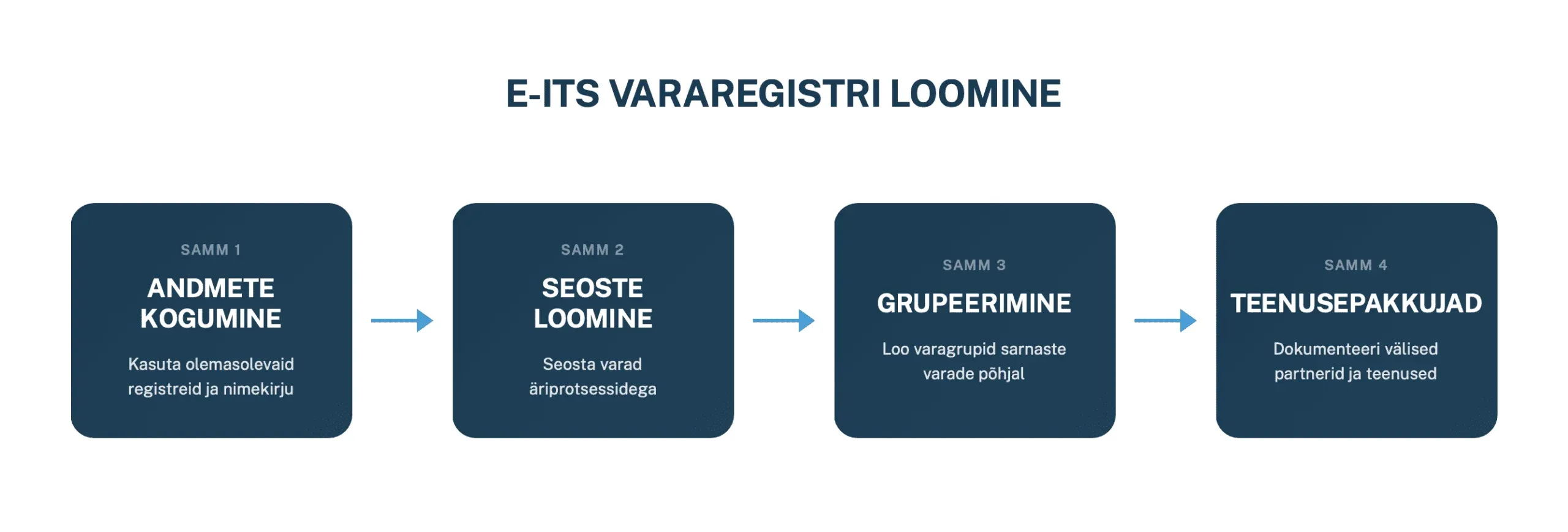
1. Start from existing data
It makes little sense to start an asset register from scratch if the organization already has several partial lists scattered around.
Good starting material often comes from:
- fixed asset lists
- IT equipment registers
- software licenses and contracts
- staff lists
- regular service subscriptions and monthly payments
The first step doesn’t need to be perfect. The goal is to consolidate existing information in one place and start filling in the gaps from there.
Where to maintain the register?
Starting in Excel or Google Sheets is perfectly fine. These work well for an initial structure and make it easy to sort and filter.
The limitation appears when you need to manage many relationships:
- one asset supporting multiple processes
- one vendor touching multiple assets
- one risk linked to multiple target objects
At that point, a spreadsheet gets constrained quickly and information starts to fragment.
2. Link assets to business processes
Once the initial list is together, the next work should be done process by process. The question is not simply which devices the organization has, but:
what is needed for a specific process to function?
This approach surfaces assets that would otherwise be overlooked:
- integrations with external partners
- cloud services
- critical rooms and spaces
- staff or committees
- network connections
- data collections
Taking a school admissions process as an example, the necessary assets might include:
- applicant data
- the admissions information system
- committee members’ work devices
- examination rooms
- IT support
That already produces a much more substantive register than just “laptops” and “a server.”
3. Group similar assets
It doesn’t make sense to treat every individual device separately if they are all protected under the same logic. That is why it is worth creating asset groups — the target objects used in E-ITS.
For example, an organization might have separate groups for:
- teachers’ laptops
- computer lab laptops
- the guest network
- the personnel data collection
Even if some of these are technically similar, their purpose and protection needs differ. That means their controls may differ too.
A useful rule of thumb: put in the same group only those assets you plan to manage and protect in the same way.
What fields should the asset register contain?
A minimum that is genuinely useful:
- asset name
- unique identifier
- description
- owner
- custodian
- related business processes
- dependencies on other assets
- location
- notes or constraints
It is also worth documenting a brief description and process link as early as possible. These provide context later when doing risk assessments and selecting protection levels.
Owner and custodian are not the same
This distinction matters in practice.
- The owner understands why the asset matters and what operational impact its failure would have.
- The custodian is responsible for day-to-day technical maintenance, configuration, or support.
When these roles get confused, the technical side starts making business decisions, or vice versa. A clear role separation keeps accountability understandable.
4. Create a separate vendor register
Vendors are frequently left out of registers almost by accident, even though the organization often depends on them as much as on its own internal systems.
The most practical approach is to maintain vendors in a separate register. This keeps a clear distinction between:
- assets where you apply technical controls directly
- suppliers and services that require contractual, procedural, and risk-based management
The vendor register should contain at minimum:
- vendor name
- service description
- contacts, including a security incident contact
- internal owner within the organization
- custodian
- related business processes
- assets the vendor has access to
- location of the service or the data
This is relevant for supply chain risk management, incident response, and audits alike.
Common mistakes
Things most often go wrong in four areas:
- only seeing physical assets and forgetting data, software, and services
- leaving cloud services and vendors out of the register
- making the register too granular by adding components that have no standalone management value
- not creating links to business processes, which leaves the register as a passive list
If the register doesn’t help answer the question of which process an asset supports and what its loss would affect, most of its value goes unused.
How Kordon helps
When a register lives only in separate spreadsheets, documents, and individual people’s heads, the system quickly becomes hard to grasp.
Kordon helps connect:
- business processes
- assets
- vendors
- risks
- controls
That means information is not just sitting in cells — it is actually linked. When an asset changes, a vendor issue arises, or a risk shifts, you can immediately see which processes are affected.
Summary
An asset and vendor register is not a one-time project. It is a living part of the management system that needs to stay current.
A good register helps you:
- understand what the organization is actually protecting
- connect assets to business processes
- choose more appropriate controls
- manage risk with less guesswork
When the foundation is weak, everything built on top of it stays weak. When the register is well structured, the whole E-ITS or ISO 27001 implementation becomes much clearer.